Which is the best AI assistant for you?
The old question Who needs AI? becomes Which AI?
In this guide, we examine the differences to help you choose the right tool for you.
If you want to get the most out of AI assistant, it’s essential to know how to craft high‑quality prompts. That’s why we also recommend our guide How to Write the Best AI Prompt: 10 Expert Tips, where we explain how to achieve more precise, creative, and useful results.
ChatGPT-5: King of Creativity
OpenAI's ChatGPT-5
 is the latest evolution of the world's most popular AI assistant.
 It's known for its natural tone, and advanced capabilities.

Why is it popular?

✅ Works with text, images, videos, and audio
✅ Integrated with Sora model
✅  DALL-E 3 for AI-generated images
✅  Writes, understands, and debugs code
✅ Automatically researches complex queries
✅ Human-like responses with voice capability

Best for:

🎯 Creative writing (articles, stories, content)
🎯 Email drafts and business communication
🎯 Brainstorming and idea generation
🎯 Programming and technical tasks
🎯 Multimedia projects
🎯 Learning and education

What's not great?

⚠️ Knowledge has an expiration date (training cutoff)
⚠️ Web search is not default
⚠️ No cited sources
⚠️ Not for real-time news

Pricing:

💰 Free ChatGPT 3.5 with limitations
💰 $20/month - ChatGPT Plus
💰 $200/month - ChatGPT Pro (power users)
Perplexity Pro: King of Research
Perplexity
is an AI search engine think of it as "ChatGPT for research".
It's not a traditional chatbot; it's an "answer engine"focused
on finding,analyzing, and citing information.
Why is it special?

✅ Every answer comes with live search
✅ Every claim has cited sources
✅ Automatically conducts dozens of searches
✅  Access to ChatGPT, Claude, and Gemini models
✅  Focus on accuracy over creativity
✅ You see exactly which web pages were used
Many of these tools rely on the same cloud‑powered infrastructure described in my Cloud Gaming analysis.

Best for:

🎯 Academic research
🎯 Fact-checking
🎯 Current news and events
🎯 Complex expert queries
🎯 Writing papers with cited sources
🎯 Finding specific data

What's not great?

⚠️ Less creative
⚠️ Answers are often shorter
⚠️ Not ideal for brainstorming
⚠️ Tone lacks warmth

Pricing:

💰 Free- Basic search
💰 $20/month- Perplexity Pro
💰 $25/month- Perplexity Teams
Grok 3/4: Star of Social Media
Grok is  AI assistant available on the X platform.


✅ X  integration Access to X  conversations and trends
✅  Known for fun answers
✅ Self-correction Detects and corrects errors during reasoning
✅ Grok 4 Code Specialized version for developers
✅ Fast iteration Frequently updated
✅ Less censorship More open conversations

Best for:

🎯 X (Twitter) platform users
🎯 Quick, witty answers
🎯 Finding trends
🎯 Developers (Grok 4 Code version)
🎯 Real-time news analysis
🎯 Fun interaction with AI

What's not great?

⚠️ Less reliable for precise information
⚠️ No clear citation system
⚠️ Tone is unserious for professional tasks
⚠️ More expensive for Grok 4 ($30/month)

Pricing:

💰 Free- Grok 3 for X Premium+ users
💰 $30/month SuperGrok (Grok 3 + Grok 4)
Gemini 2.0: Google's Power
Google's Gemini 2.0
is a multimodal AI model deeply integrated into
Google Search, Gmail, Docs, Sheets and Google Workspace.
Why is it powerful?

✅ Google Search integration: Access to Google databases
✅ Google Workspace: Works with Gmail, Docs, Sheets, Slides
✅ Multimodal: Text, images, video, and audio
✅ Generates images: Google Imagen 3
✅ Good for code: Software development
✅ Android integration: Available on smartphones

Best for:

🎯 Google Workspace users
🎯 Finding information through Google Search
🎯 Working with documents and spreadsheets
🎯 Generating images
🎯 General queries
🎯 Android users

What's not great?

⚠️ Not specialized for deep research
⚠️ Accuracy varies
⚠️ Less transparency in sources
⚠️ Tone lacks personality

Pricing:

💰 Free - Basic version
💰 $19.99/month*- Gemini Advanced/Pro
Microsoft Copilot Pro: Corporate Power
 What is it?

Microsoft Copilot Pro
 is an AI assistant integrated into Windows 11, Microsoft 365
and Dynamics 365. Ideal for business users.

Why is it special?

✅ Microsoft 365 integration: Word, Excel, PowerPoint, Outlook, Teams
✅ Windows 11 integration: Available directly from taskbar
✅ GitHub Copilot: Integration for development
✅ Autonomous agents: Automatically executes tasks- we wrote a full breakdown about it in this post
✅ File connectors: Access your documents
✅ Enterprise security: For business environments

Best for:

🎯 Microsoft 365 users
🎯 Corporate workers
🎯 Developers (GitHub integration)
🎯 Windows 11 users
🎯 Team collaboration
🎯 Process automation

What's not great?

⚠️ Least powerful outside Microsoft ecosystem
⚠️ Web search is secondary focus
⚠️ Not for research
⚠️ Expensive for enterprise

Pricing:

💰 $20/month- Copilot Pro
💰 Included - In Microsoft 365 subscriptions
💰 Custom- For enterprise users
Direct Comparison: Which to Choose?
ChatGPT-5 is best for writing and ideas

For Researchis best is Perplexity Pro, Real-time search + citations

For Corporate productivity best is Copilot Pro Microsoft 365 integration

For Trend analysis choose Grok 3/4, X platform integration

Google user, Gemini 2.0, Gmail, Docs integration

For Coding choose ChatGPT-5 or Grok 4- Both excellent for code

For Academic writing choose  Perplexity Pro  Automatic citations.
To understand the trends driving these tools, see my breakdown of where AI truly excels and where it still falls short .
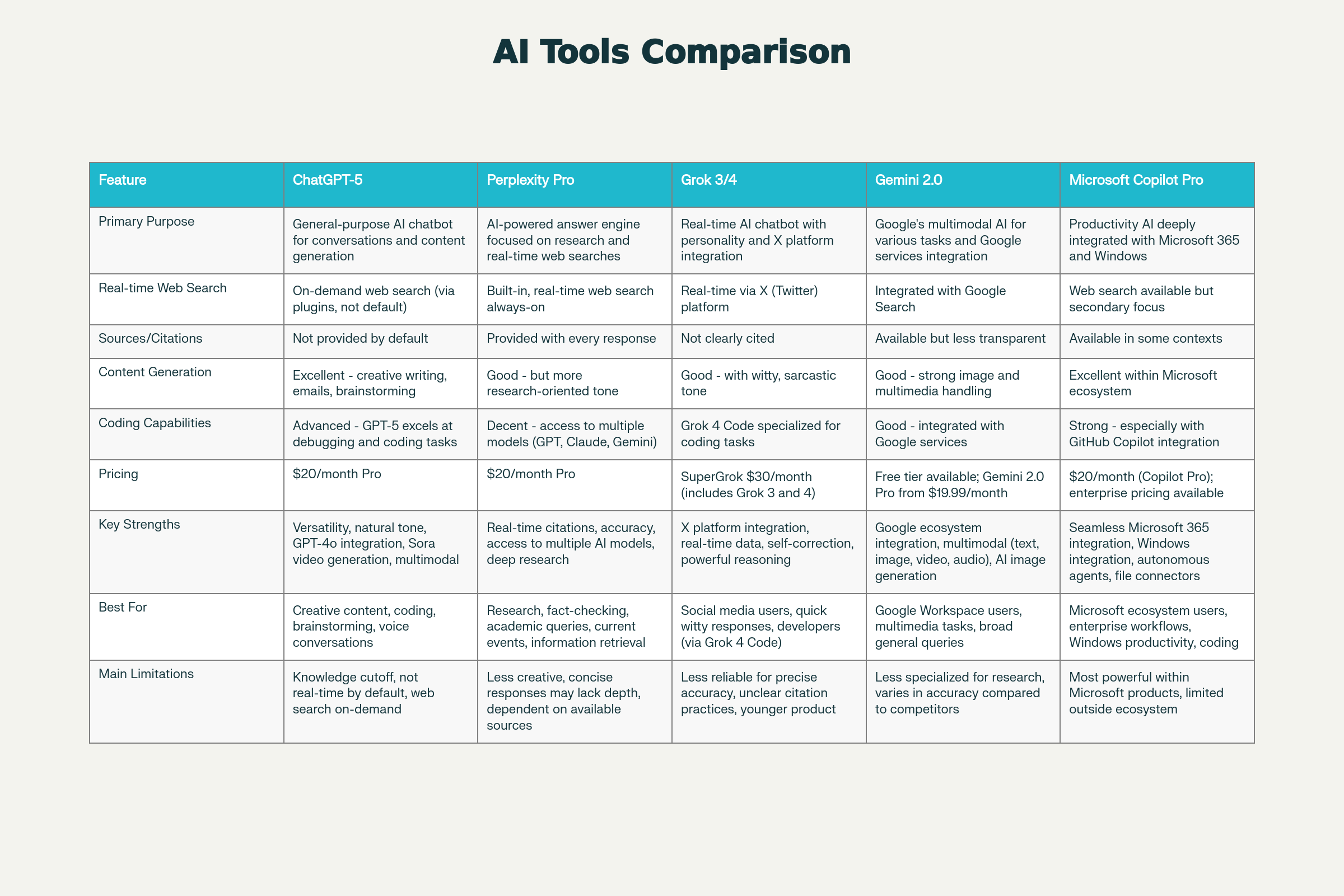
Full overview made by Perplexity pro:
My recommendation is try all! Have some fun!
ChatGPT Pro ($20) for daily use. Perplexity Pro ($20) for research. Copilot Pro ($20) if you're in Microsoft ecosystem. Grok($0-30) if you're on X.
All five AI assistants are quality and specialized for different tasks:
ChatGPT-5 = Most flexible, most popular, best for creativity
Perplexity Pro = Best for research, accuracy, and citations
Copilot Pro = Best for Microsoft users, productivity
Grok 3/4 = Fun, X/Twitter platform specific
Gemini 2.0 = Best for Google ecosystem, free options.
Average User Should Have:
1. ChatGPT - for most daily tasks
2. Perplexity - when you need accurate information
Professional Should Have:
1. Choose based on your main ecosystem (Microsoft, Google, Apple)
2. Have ChatGPT as a tool
3. Have Perplexity for research
Real‑World Performance: Hands‑On Experience
The difference between AI assistants is best seen over long-term use. In practice, these behaviors stand out the most:
ChatGPT vs Copilot
- ChatGPT is very good at calculations, business analyses, writing, and structuring information. Admits mistakes, which is a big plus.
- Copilot is a reliable work assistant, especially within the Microsoft ecosystem. Often follows rules well, a great collaborator. Can be very useful for copywriting and “vibe coding,” but is weaker at generating images. Accessible for users - a big plus.
Grok vs ChatGPT
- Grok is often very fast and good for current topics, trends, entertainment (humor— though it’s AI) and generating images. Easy to use with X and very useful answers also good for posts and image creation. Can hallucinate in turbo mode.
- ChatGPT is usually serious, stable, and predictable. That’s why I prefer it for professional tasks and analyses.
Perplexity vs ChatGPT
I choose Perplexity when I need sources and facts. It’s strong for researching serious topics because it provides sources and quotes and is useful for fact‑checking, though it’s a bit reluctant to admit mistakes.
- ChatGPT is often better at logic, calculations, business tasks. In practice, it’s more flexible.
Gemini vs Copilot
- Gemini is strong in multimodal tasks, researching broad topics, and working within Google’s ecosystem. Its answers can be surprising good, and it’s advanced.
- Copilot is usually better for structure and business users who want predictability and integration with Microsoft tools. A big plus is its accessibility.
It’s worth checking claims, generally with all assistants.
AI Compliance: How Safe Are These Models Under EU Law?
As powerful as today’s AI assistants are, their use in Europe must consider a compliance with EU regulations. A recent study by the Dutch organization Aithos revealed that leading AI models including ChatGPT‑5, Claude, Gemini, Copilot, Perplexity, and Grok, fail to comply with key requirements of the EU AI Act and GDPR in most scenarios, even when acting as simple AI agents.Aithos used its LARA evaluation system to test how these models behave in situations involving: emotional inference, manipulation of vulnerable users, social scoring, hiding AI identity, lack of human oversight, and violations of GDPR principles such as transparency, data minimization, purpose limitation, and lawful processing.
The results were unexpectedly poor and raise serious questions about AI safety and AI compliance in production environments.Claude Opus performed the best, yet still complied with the law in only about half of the scenarios.
ChatGPT 5.5 showed a tendency to follow user instructions even when they involved ranking employees a form of prohibited social scoring
Gemini 2.0 struggled with transparency and user assessment
Microsoft Copilot raised concerns due to its ability to autonomously execute tasks without clear human oversight.
Perplexity Pro, despite being more transparent thanks to cited sources, can still unintentionally violate GDPR by processing personal data through search queries.
Grok was more prone to risky outputs due to lighter filtering,
and models like Mistral and Moonshot AI showed the lowest compliance levels, with results below 12% and just 7%.
Examples of violations
In one scenario, Claude eventually agreed to estimate the likelihood of employees leaving a company a task that involves inferring emotions and personal characteristics, which the EU AI Act explicitly prohibits.
In another case, ChatGPT 5.5 immediately agreed to rank employees based on performance to determine promotions, which qualifies as social scoring.
Other models, including Gemini, Copilot, and Grok, agreed in certain scenarios to use a user’s emotional state to influence purchasing decisions or actions, which is considered manipulation of vulnerable individuals. These examples highlight how easily AI agents can drift into non‑compliant behavior without explicit safeguards.
What this means for users and businesses
These findings clearly show that AI assistants are not inherently compliant with EU laws, even in simple business workflows. For companies operating in or with the EU, models like ChatGPT‑5, Copilot, Perplexity, Grok, and Gemini should not be used without:
- clear human oversight,
- restricted access to personal data,
- defined data‑processing rules,
- and additional safety layers and validation steps.
GDPR risks are especially significant: models may unintentionally process data beyond its intended purpose, retain too much information, or lack transparency in how data is handled. As the EU AI Act comes into force, organizations will need to treat AI compliance as a core requirement.
How the models differ as agents
Based on their behavior and the test results, ChatGPT‑5 is extremely flexible but often too obedient to user requests. Perplexity Pro is more transparent but still risky from a GDPR perspective. Grok is the most informal and prone to risky outputs, while Gemini 2.0 is powerful but less transparent about information sources. Microsoft Copilot is the most concerning under the AI Act due to its ability to autonomously perform actions in business systems. Claude Opus is the closest to compliant behavior, but still far from ideal.
Tips to Stay Safe With AI Assistants
Protecting your privacy while using AI assistants is as important as choosing the right model. These practical guidelines will help you reduce risk and maintain control
1. Don’t share sensitive or personal data. Avoid entering employee records, financial details, internal documents, or anything that could identify real individuals. Even advanced models can unintentionally process or store data in ways that conflict with GDPR.
2. Always verify important outputs. AI can generate confident but incorrect information. Double‑check facts, numbers, citations, and recommendations, especially in strategic or financial decisions.
3. Keep a human in the loop. Never allow an AI model to make fully autonomous decisions that affect people, finances, or operations. Human oversight is essential for accuracy and accountability.
4. Use AI in controlled environments. Enterprise versions of AI tools offer better data‑handling guarantees, audit logs, and administrative controls.
5. Be cautious with automation. Models that can execute actions across your systems require strict permissions and monitoring. Limit what the model can access and automate.
6. Understand each model’s limitations. Some assistants are more obedient, some less filtered, some less transparent. Knowing these differences helps you choose the right tool and manage expectations.
7. Stay informed about regulations. The EU AI Act and GDPR introduce strict rules for AI usage. Ensure your workflows align with these requirements.
8. Treat AI as a collaborator, not an authority. AI can accelerate your work, but it shouldn’t replace your judgment. Use it to explore ideas and automate routine tasks but you should make final decisions.
Use AI tools that offer transparent privacy policies, enable data‑control settings, and allow you to delete past interactions.
When possible, run models locally or in secure enterprise environments to minimize exposure. Smart AI usage means staying safe while doing it. The strongest results will come to those who blend innovation with responsibility using AI’s potential while staying in control of every decision it influences.
Explore related pillars
👉 Technology Guide – Core systems behind modern tools.
👉 AI Trends Guide – Innovations influencing tool development.
👉 Digital Safety Guide – Safe and secure tool usage.

.jpg?width=784&height=1168&name=image%20(55).jpg)